How it works
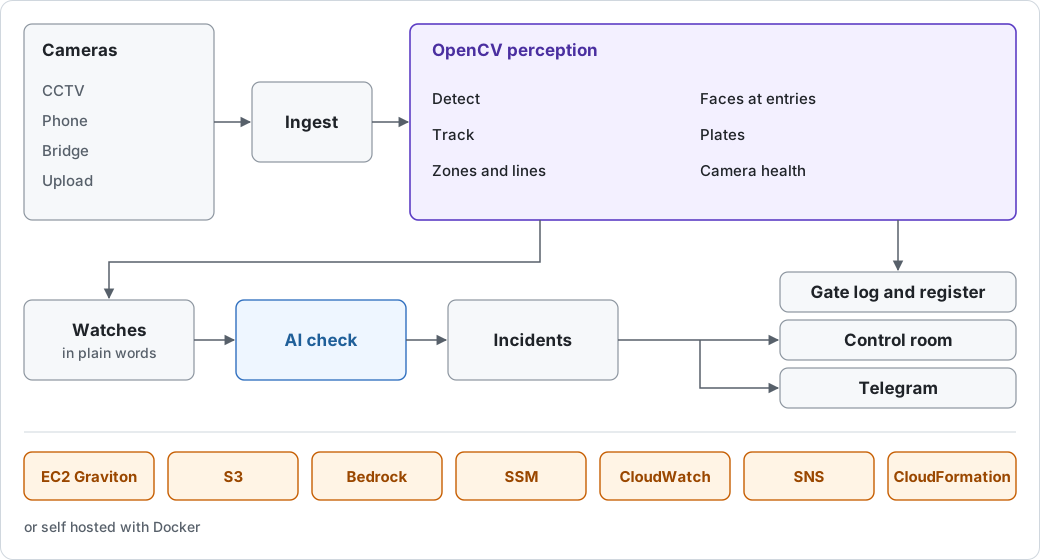
OpenCV does the watching on every camera. The AI only checks the moments OpenCV flags, and never watches a stream.
From a camera to an alert
- Pictures arrive from recorders and IP cameras over RTSP, the bridge, a phone or laptop, or an upload.
- Camera processes run the OpenCV pipeline at the analysis rate: detect, track, zones and lines, pose, faces at entries, plates, camera health.
- A watch in plain words is compiled once, by the AI, into general signals such as "a person inside the pool zone after 8 PM". A rule engine checks those signals on every analysed frame and flags a candidate.
- The agent checks the candidate with OpenCV tools and decides what happens.
- An incident opens, graded critical, warning or info, with a still and a clip, in the control room and on Telegram.
- Gate crossings and staff seen at entries are written to the logs.
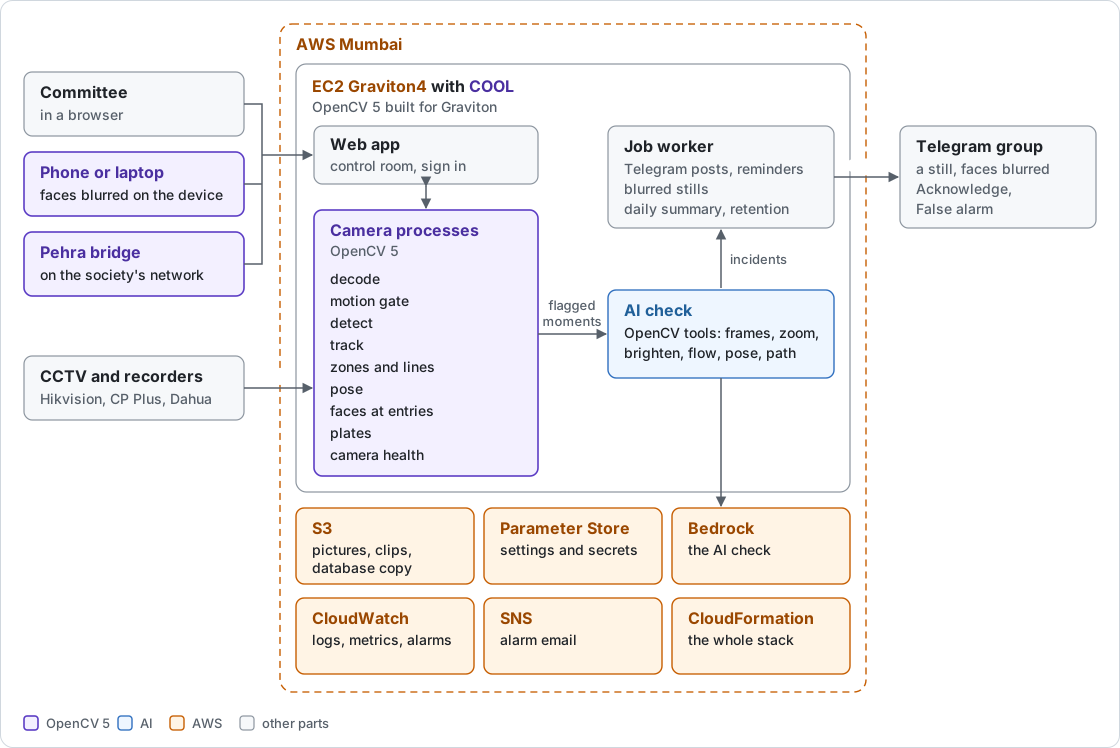
What OpenCV does
| Step | OpenCV | Why |
|---|---|---|
| Read cameras and recordings | cv2.VideoCapture with FFmpeg | RTSP streams, uploads and the demo clip |
| Pictures from phones and the bridge | cv2.imdecode after a size check | a tiny file cannot decode to gigabytes |
| Skip still scenes | createBackgroundSubtractorMOG2, morphologyEx, findContours | the detector runs when something moves |
| Dark frames | createCLAHE | brightened before detection at night |
| People and vehicles | YOLOX nano on cv2.dnn, NMSBoxesBatched | every analysed frame |
| Tracking | cv2.KalmanFilter | steady ids for dwell time and line crossings |
| Zones and lines | pointPolygonTest | inside, entering and crossing with a direction |
| Falls and posture | MediaPipe pose on cv2.dnn, warpAffine | torso angle over time |
| Movement inside a box | DISOpticalFlow_create | a still body in moving water |
| Faces | FaceDetectorYN (YuNet), FaceRecognizerSF (SFace) | blur everyone; match consenting staff at entries |
| Plates | LPD-YuNet and PP-OCR on cv2.dnn, warpPerspective | the gate log's plate text and colour |
| Camera health | ORB, BFMatcher, findHomography with USAC_MAGSAC, Laplacian | turned, blurred or covered cameras |
| Gate open or closed | GaussianBlur, CLAHE, Sobel, matchTemplate | a zone's state against example pictures |
| Looks described in words | SigLIP 2 on ONNX Runtime, or cv2.dnn | the image and text model; OpenCV prepares every crop |
| The agent's tools | resize and unsharp mask, CLAHE, fastNlMeansDenoisingColored, DIS flow | a closer look at a flagged moment |
| Telegram stills | GaussianBlur on face boxes, imencode | faces of anyone not enrolled are blurred |
| The phone camera page | OpenCV.js FaceDetectorYN | faces blurred before a picture leaves the phone |
The agent
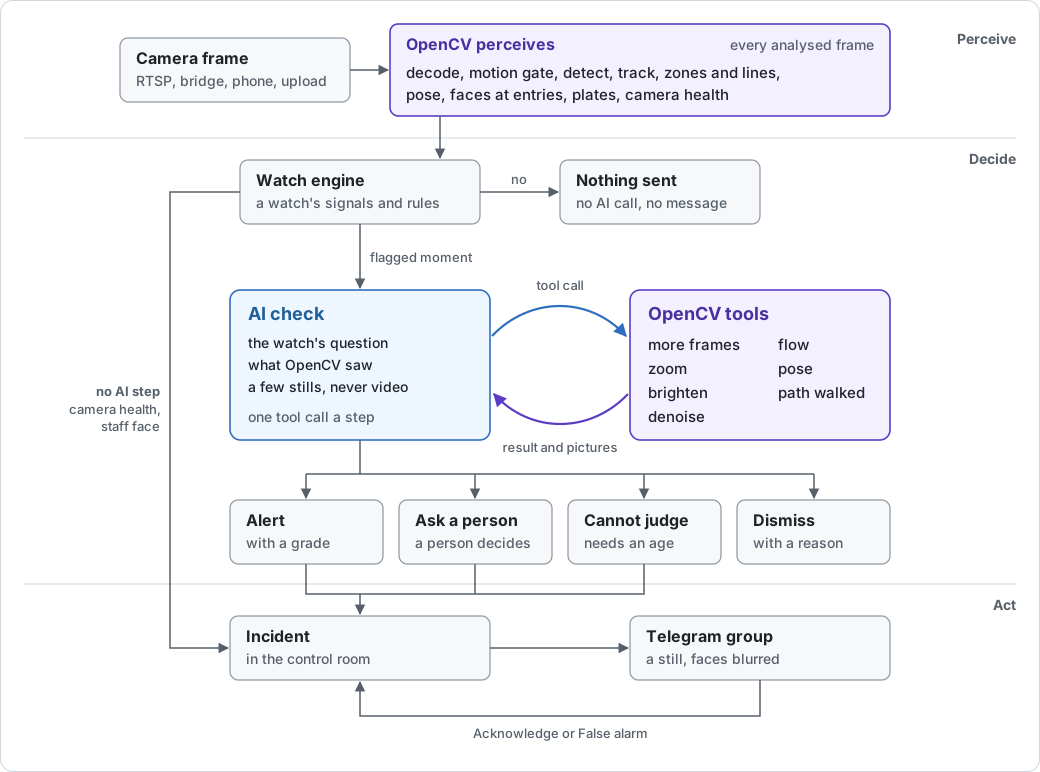
The agent is an LLM that sees only a flagged moment: a few stills and the watch's words. It can look closer with OpenCV tools (frames from the moment, a sharpened zoom, brighten, denoise or sharpen, optical flow inside the box, the person's pose over time, the path walked), then it must finish one way:
- raise the alert, with a grade and a short reason;
- dismiss it, because the pictures show it is not what the watch asks for;
- ask a person, for a serious moment someone should decide;
- or say it cannot judge, when the question needs someone's age, which it never judges.
What the AI does not decide:
- A critical alert goes to Telegram at once, before the check. A critical watch is dismissed only when the pictures clearly show everyone is safe.
- Past the daily AI limit, or when the AI cannot be reached, a moment is still filed, marked not checked by the AI.
- Camera health and enrolled staff faces are measured by OpenCV; no AI looks at them.
- It never names anyone. Only OpenCV recognises people, and only consenting adult staff at entries.
On AWS the AI is Claude Haiku 5.5 on Amazon Bedrock. The live demo uses an OpenRouter model. The same AI also compiles watches, answers questions about what happened, and searches footage by words.
The full design, the evaluation and the failure cases are in the technical report.
Next: Privacy and safety